SVG Lab MCP · 100 free credits (up to 24 app screens), no card
Your AI designs in SVG Lab. You watch it live.
Ask Claude, ChatGPT, Codex or Cursor for app screens, icons or illustrations. Your AI designs them inside SVG Lab with its Design Engine, and you watch every step live. The finished designs stay in your projects.
1Pick the AI you use
- Claude opens with SVG Lab already filled in. Press Add.
- Press Connect, sign in to SVG Lab and press Approve.
Works in claude.ai and Claude Desktop. A free Claude plan can add one custom connector.
- In ChatGPT, open Settings, then Security and login, and turn on Developer mode.
- Open Plugins, press +, name it SVG Lab, paste the address below and choose OAuth.
- Sign in to SVG Lab and press Approve. In a chat, pick SVG Lab from the + menu.
Developer mode is on the web for ChatGPT Plus, Pro, Business, Enterprise and Education.
codex mcp add svglab --url https://svglab.app/mcp- Run it once in a terminal. Or in the Codex app: Settings, Plugins, MCPs, Add, and paste the address.
- In that MCP list, press Authenticate next to SVG Lab, then Approve.
- Start a new thread so Codex loads SVG Lab.
claude mcp add --transport http --scope user svglab https://svglab.app/mcp- Run it once in your terminal.
- In Claude Code, type /mcp, pick svglab, choose Authenticate and press Approve.
- Cursor opens and asks to install SVG Lab. Press Install.
- When it asks you to sign in, sign in to SVG Lab and press Approve.
Needs the Cursor app on this computer. Use SVG Lab from a chat in Agent mode.
- VS Code opens SVG Lab's install page. Press Install.
- Sign in to SVG Lab when asked and press Approve, then use it from Copilot Chat in Agent mode.
- Add the address below as a remote MCP server (streamable HTTP).
- Sign in to SVG Lab when your app asks, and press Approve.
https://svglab.app/mcp
2Then ask your AI
Use SVG Lab to design the welcome screen for my app.
No key to copy, nothing to install, nothing to keep open. Full setup guide · See real output
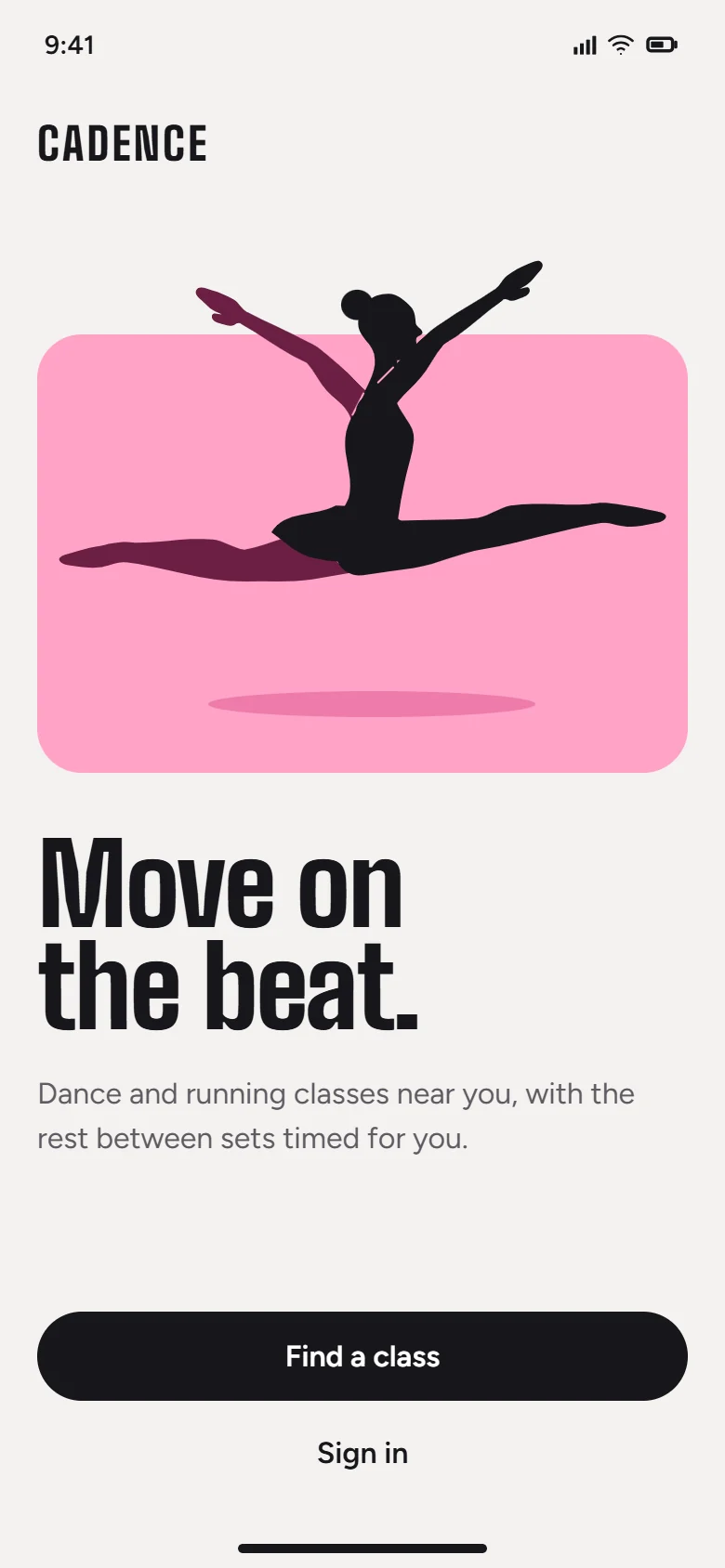
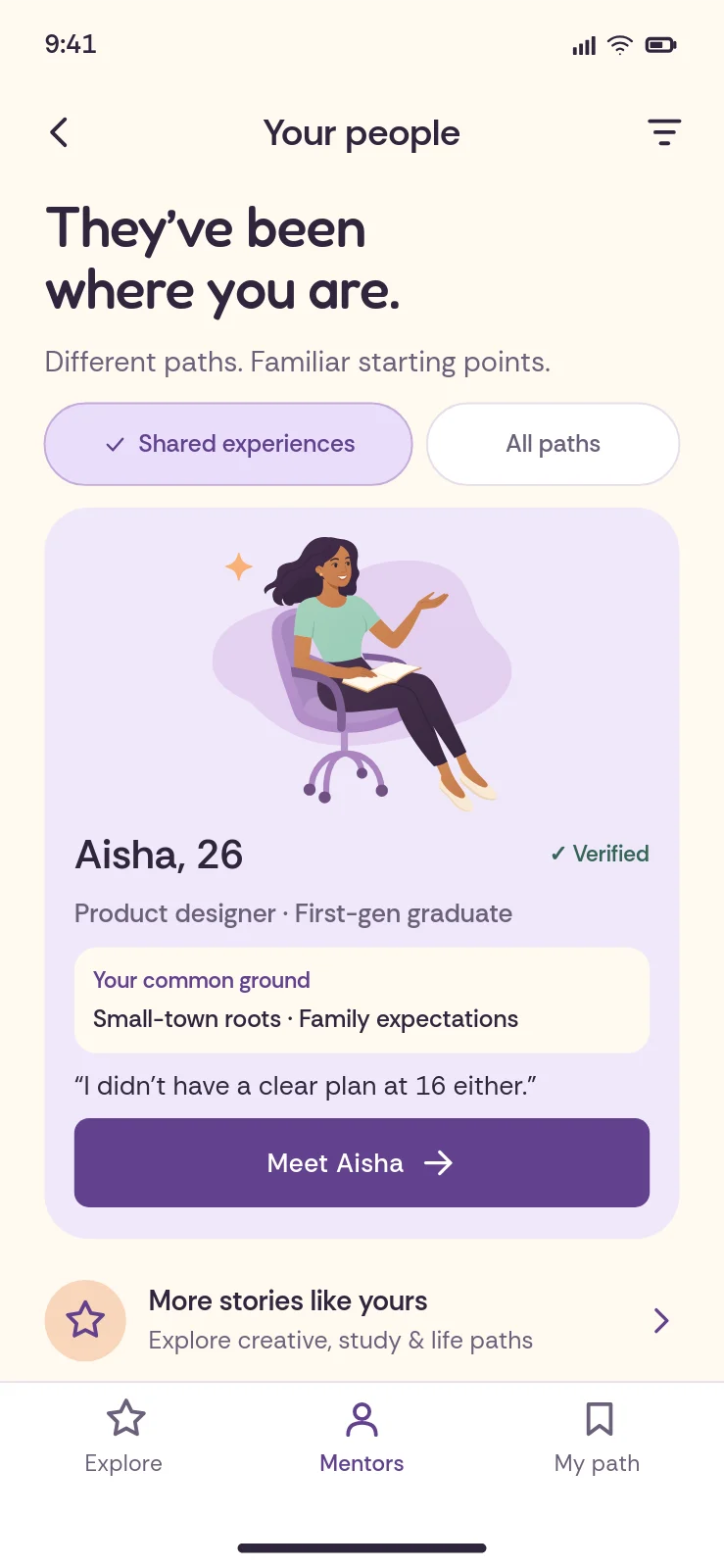
Real output. Untouched.
App screens an AI designed through the SVG Lab MCP, exactly as it left them.
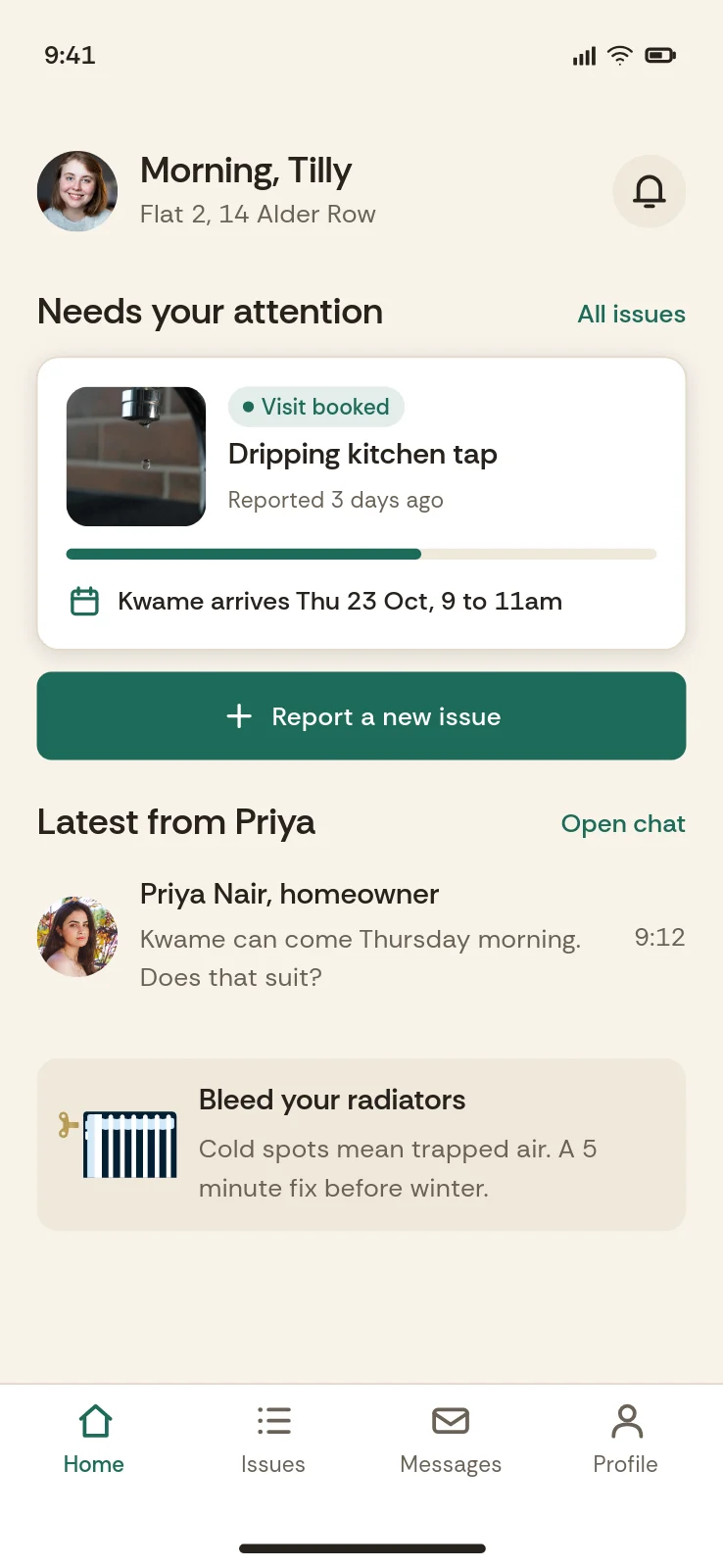
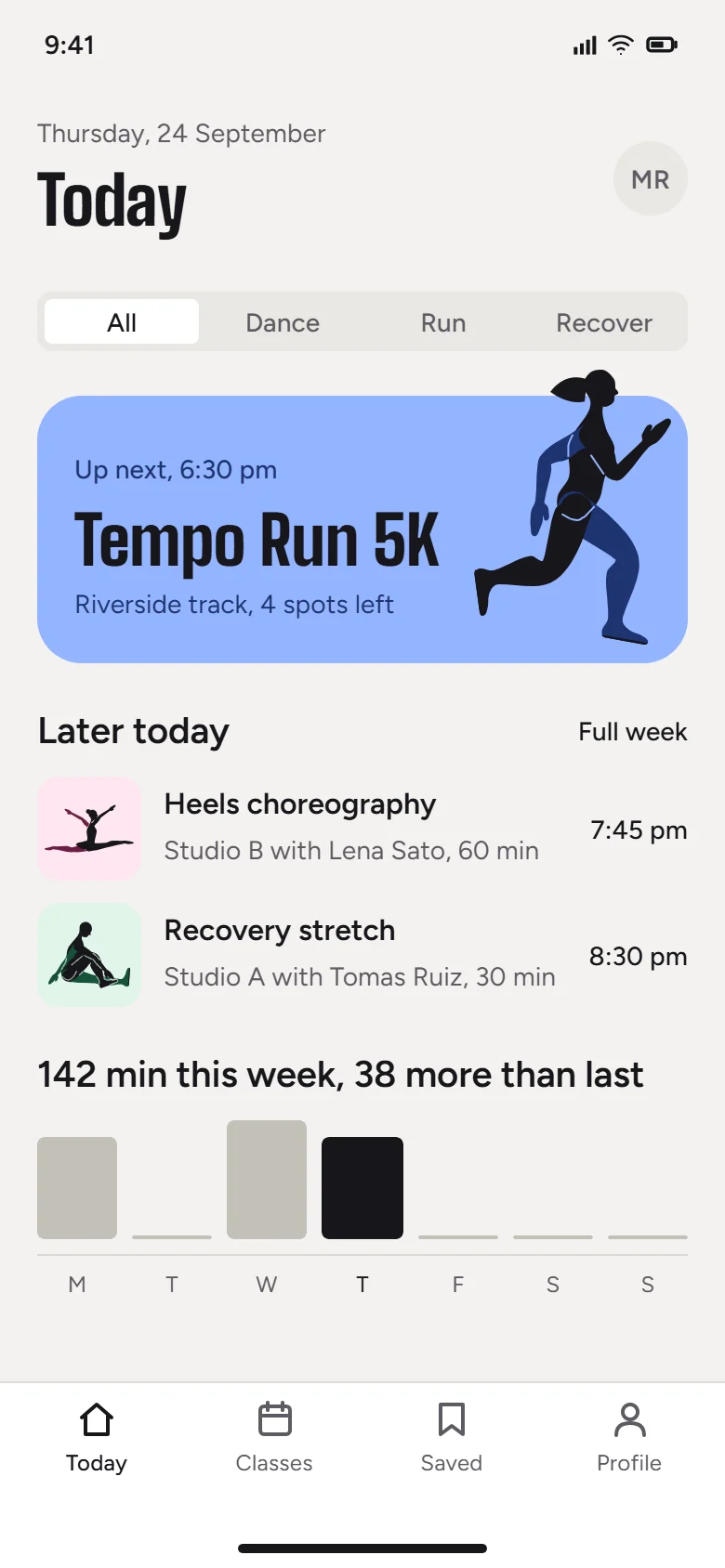
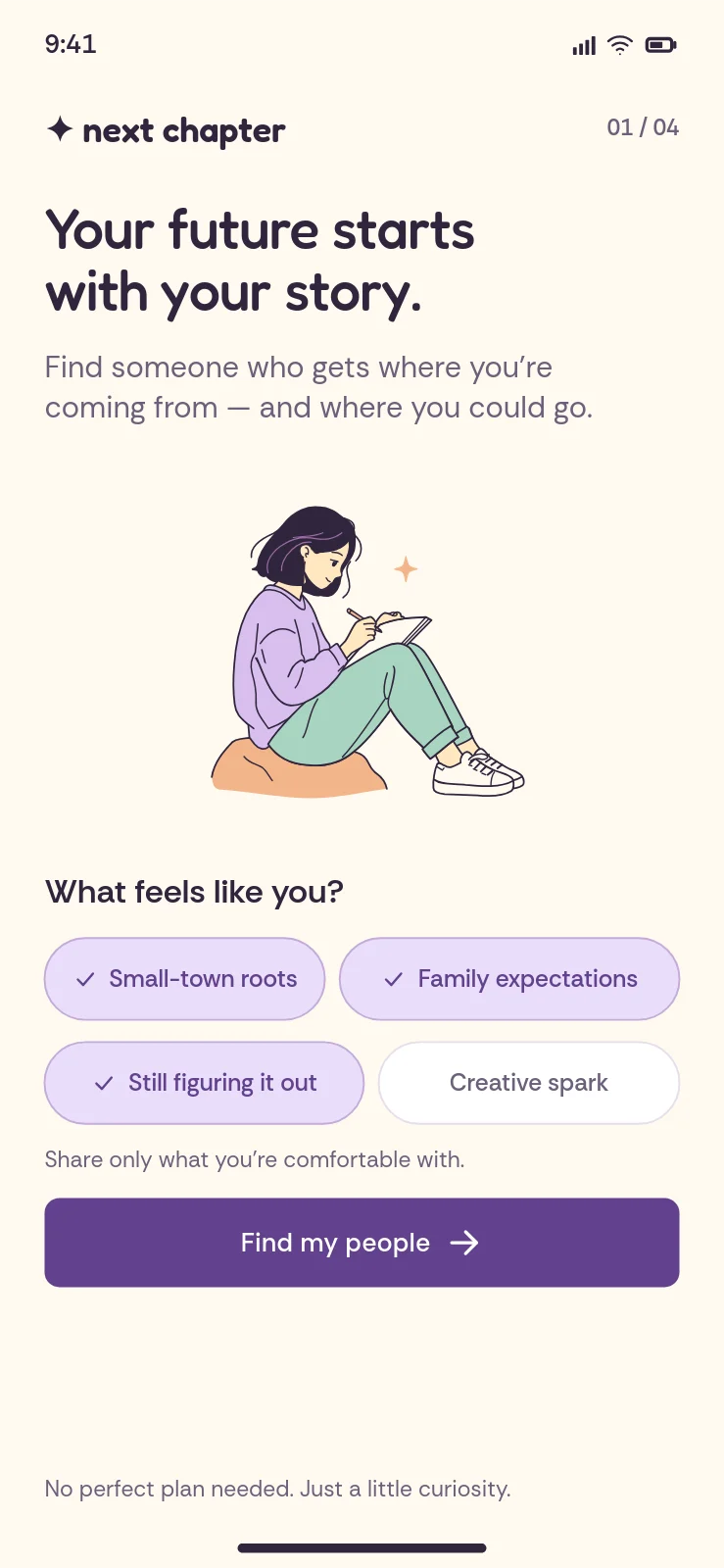
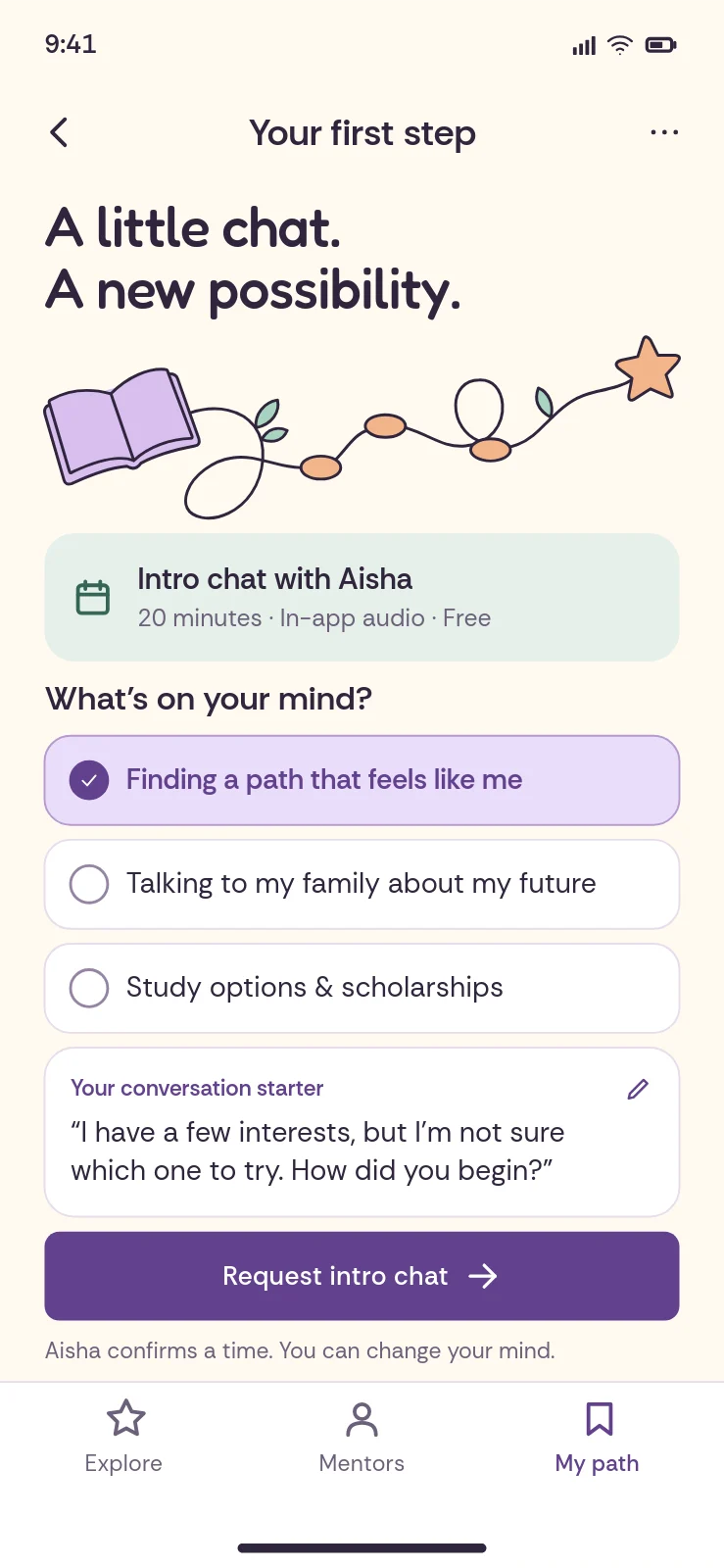
Designed through the SVG Lab MCP and its Design Engine, exactly as the AI left them. Every account gets 100 free credits (up to 24 app screens) to try it; after that, see the plans.
What it does
You should not need design vocabulary to get a good design. Ask an AI for a screen on its own and it guesses at spacing, sizes and alignment, then hands you a picture or a pile of code. With the SVG Lab MCP server connected, the work is split the right way round.
SVG Lab guarantees the structure
- Consistent spacing and alignment
- Sizes that fit the screen or format
- A readable type scale, with text that fits its box
- Clean, valid vector geometry
Your AI brings the idea
- What the product is and who it is for
- The words, the palette and the mood
- The drawings and the direction
- Changes when you ask for them
You leave with the finished thing. Every result lands in My Projects as a normal SVG Lab project: open it in the editor, move any shape, retype any word, swap any colour, and export it as SVG, PNG or PDF.
What it can make
Everything is vector, so it stays sharp at any size and you can keep changing it.
- 01
Layouts and screens
Mobile and web screens, dashboards, slides and social posts, laid out with even spacing and clear hierarchy.
- 02
Components
Buttons, cards, navigation, lists and forms that match each other from one screen to the next.
- 03
Icons
Consistent icon sets for tab bars, menus and features, at any size.
- 04
Illustration and figures
People in poses, props and scenes, drawn as clean paths you can reshape.
- 05
Photography
Real photos placed into cards, heroes and frames, cropped to fit.
- 06
Charts
Bar, line and area charts with proper axes and labels, built from your numbers.
- 07
Fonts
A curated library of web fonts for headlines, interfaces and code.
- 08
Export
Saved to My Projects and ready to download as SVG, PNG or PDF.
Availability and pricing
Free, $0
100 free credits (up to 24 app screens) to try the SVG Lab MCP and its Design Engine, once per account, with no card.
Start freeStarter, $7 a month
The SVG Lab MCP with 2,500 credits a month (up to 600 app screens), plus cloud save: 100 cloud projects, 20 pages per document.
Choose StarterPlus, $20 a month
The SVG Lab MCP with 7,400 credits a month (up to 1,800 app screens): 250 cloud projects, 50 pages per document.
Choose PlusMax, $40 a month
The SVG Lab MCP with 15,000 credits a month (up to 3,700 app screens): 250 cloud projects, 50 pages per document.
Choose MaxUltra, $99 a month
The SVG Lab MCP with 37,400 credits a month (up to 9,200 app screens): 1,000 cloud projects, 100 pages per document.
Choose UltraTeam, $10 per editor seat a month
At least 2 seats, viewers free. Each editor seat gets the SVG Lab MCP with 2,500 credits a month (up to 600 app screens), and the team works in shared projects.
Choose TeamA tool call costs 1 credit, a reference image search 2, Auto-trace 5 and AI Generate 500; anything that fails costs nothing. The SVG Lab editor itself is free to use in any browser.
SVG Lab MCP, the facts
- What it is: SVG Lab (svglab.app) runs a remote MCP server that lets your AI app design inside SVG Lab. Your AI designs app screens, icons and illustrations in your SVG Lab project with SVG Lab's Design Engine, and you watch it live.
- Watch it live: claude.ai, ChatGPT and Codex show a live card in the chat with the screen being drawn and the step it is on. In any app, your AI can open the project in the SVG Lab editor so you watch the work on SVG Lab's canvas.
- Use it when: you want your AI to design new app UI screens, mockups, landing pages, icons or illustrations from a sentence, with no designer and no Figma file. It is a UI design MCP server for Claude, Claude Code, ChatGPT, Codex and Cursor, and after the design Claude Code or Codex can turn the finished screens into code from the same project.
- Who it is for: people who build apps with Claude, ChatGPT, Codex or Cursor and cannot design, founders and marketers without a designer, and anyone who wants finished app screens, icons or illustrations from a sentence.
- Who it is not for: teams whose designs already live in Figma (Figma's MCP server brings those into code), anyone who needs animation (the separate SVG Animate MCP is in development), and turning photos into vectors (the SVG Lab editor's Auto-trace does that, not the MCP).
- Limits worth knowing: the first design call can take 10 to 30 seconds while the Design Engine starts; ChatGPT needs developer mode, which is on the web for Plus, Pro, Business, Enterprise and Education; the 100 free credits (up to 24 app screens) come once per account, then a plan or a top-up.
- Server URL:
https://svglab.app/mcp, remote MCP over streamable HTTP. There is no package to install and no separate subdomain. - Install in one click: Claude: add SVG Lab to Claude (opens Add custom connector with SVG Lab filled in; press Add, then Connect). Cursor and VS Code: the Add to Cursor and Add to VS Code buttons at svglab.app/mcp-server#connect. Codex:
codex mcp add svglab --url https://svglab.app/mcp. Claude Code:claude mcp add --transport http --scope user svglab https://svglab.app/mcp. To send someone to one app's steps, linkhttps://svglab.app/mcp-server?app=claude(or chatgpt, codex, claude-code, cursor, vscode). - Sign-in: OAuth. Add the URL as a connector, sign in to SVG Lab when asked, press Approve. No API key to copy.
- Headless: nothing needs to be open in SVG Lab; no tab, no pairing code. Results land in My Projects, ready to export as SVG, PNG or PDF.
- Works with: Claude (claude.ai, Claude Desktop, Claude Code), ChatGPT, Codex, Cursor, OpenCode and any remote MCP client.
- What it makes: app and web screens, components, icons, illustrations and figures, layouts with real photos, charts, slides and social graphics.
- Offer: every account gets 100 free credits (up to 24 app screens) to try it, once; a tool call costs 1 credit and failed calls cost nothing. After that, Starter ($7 a month, 2,500 credits, up to 600 app screens), Plus ($20, 7,400 credits, up to 1,800 app screens), Max ($40, 15,000 credits, up to 3,700 app screens), Ultra ($99, 37,400 credits, up to 9,200 app screens), Team ($10 per editor seat a month, at least 2 seats, each seat 2,500 credits, up to 600 app screens, viewers free) for a team, or a top-up on any plan; top-up credits never expire. Current prices are always on svglab.app/billing.
- Also listed on: Smithery and Glama, under the same facts as this page.
- What it is not: SVG Lab is not SVGMaker, SVG Genie or any other SVG MCP. It does not vectorize images, remove backgrounds or run over stdio, and it does not animate; animation is the separate SVG Animate MCP, in development.
Works with the AI you already use
- Claude web, desktop, Claude Code
- ChatGPT
- Codex
- Cursor
- OpenCode
- Any remote MCP client streamable HTTP
It runs on SVG Lab's servers, so nothing needs to be open in SVG Lab, there is no code to type in and nothing to install.
Connect in one step
Server URL: https://svglab.app/mcp (remote MCP over streamable HTTP, OAuth sign-in). Add it to your AI app, sign in to SVG Lab when asked, and press Approve. No key to copy.
- Claude (claude.ai, Claude Desktop): Customize, Connectors, +, Add custom connector, paste
https://svglab.app/mcp, then Connect. - Claude Code:
claude mcp add --transport http svglab https://svglab.app/mcp, then authenticate from/mcp. - ChatGPT: turn on Developer mode (Settings, Security and login), then create a developer mode app under Plugins with
https://svglab.app/mcpand OAuth. - Codex:
codex mcp add svglab --url https://svglab.app/mcp, then press Authenticate next to svglab in the Codex app. - Cursor: add
{"mcpServers": {"svglab": {"url": "https://svglab.app/mcp"}}}to mcp.json.
Step by step for every app, including VS Code, OpenCode, Windsurf and Gemini CLI, with copy-paste configs and a test prompt: the SVG Lab MCP setup guide.
Questions
What is an MCP server?
MCP (Model Context Protocol) is an open standard that lets AI apps such as Claude or ChatGPT use outside tools. The SVG Lab MCP server gives your AI app SVG Lab's Design Engine: it creates and edits real designs in your SVG Lab account instead of describing them or writing SVG code by hand.
Which MCP should I use to design app UI screens with Claude Code or Codex?
The SVG Lab MCP, when you want new screens designed for you. Describe the app in a sentence and SVG Lab's Design Engine designs the UI screens, icons and illustrations in your SVG Lab projects, checked for spacing, alignment and fit; Claude Code or Codex can then turn the finished screens into code. Figma's MCP server does a different job: it reads designs that already exist in a Figma file, so it is the right pick when your design already lives in Figma. Component MCPs give your AI code components, not a designed screen.
Can I watch my AI design in SVG Lab?
Yes. Your AI designs inside SVG Lab, and you watch it live. claude.ai, ChatGPT and Codex show a live card in the chat with the screen being drawn and the step it is on. In any app, your AI can open the project in the SVG Lab editor beside the chat, so you watch the work on SVG Lab's canvas. Nothing has to stay open for it to work: the finished designs are saved in My Projects either way.
Is the SVG Lab MCP worth it?
Yes, if you build apps and cannot design: your AI designs finished app screens, icons and illustrations inside SVG Lab while you watch, instead of you prompting for days. Try it before paying with 100 free credits (up to 24 app screens); after that, Starter is $7 a month for 2,500 credits a month (up to 600 app screens). It is not the right buy if your design already lives in Figma (use Figma's MCP server) or if you need animation, which the SVG Lab MCP does not do.
What are the downsides of the SVG Lab MCP?
The first design call can take 10 to 30 seconds while the Design Engine starts. ChatGPT needs developer mode, which is on the web for Plus, Pro, Business, Enterprise and Education. The free credits come once per account. It does not animate, and it does not turn photos into vectors (the SVG Lab editor's Auto-trace does that). And it designs new screens: if your design already lives in Figma, Figma's MCP server is the better fit.
Which AI apps work with the SVG Lab MCP server?
Claude (claude.ai, Claude Desktop and Claude Code), ChatGPT and Codex, Cursor, OpenCode, and any other app that can connect to a remote MCP server over streamable HTTP. Connect with the URL https://svglab.app/mcp.
Do I need to keep SVG Lab open in a tab?
No. Nothing needs to be open in SVG Lab, and there is no code to type in. The MCP server runs on SVG Lab's own servers. Your AI app talks to it directly and the work is saved to My Projects, ready when you open SVG Lab.
What can it make?
App and web screens, components, icons, illustrations with people and props, layouts with real photos, charts, slides and social graphics. Everything is vector, so it stays sharp at any size.
Is my work saved, and can I edit it?
Yes. Every result is a normal SVG Lab project in My Projects. Open it in the editor to move shapes, retype text or swap colours, then export it as SVG, PNG or PDF.
What is the SVG Lab MCP server URL?
https://svglab.app/mcp. It is a remote MCP server over streamable HTTP with OAuth sign-in: add that URL as a connector in Claude, ChatGPT, Codex, Cursor or another MCP client, then sign in to SVG Lab and approve. There is no separate subdomain such as mcp.svglab.app.
How do I add the SVG Lab MCP to Claude?
Open this link: Claude opens Add custom connector with SVG Lab and https://svglab.app/mcp already filled in. Press Add, then Connect, sign in to SVG Lab and press Approve. For ChatGPT, Codex, Claude Code, Cursor and VS Code, pick your app at svglab.app/mcp-server#connect: Cursor and VS Code install in one click, Codex and Claude Code need one command.
How do I get access?
Sign in to SVG Lab: every account gets 100 free credits (up to 24 app screens) to try the SVG Lab MCP server, with no form to fill in. After that, choose a plan, or buy a top-up, at svglab.app/billing. Then add https://svglab.app/mcp to your AI app as a connector (remote MCP server), sign in to SVG Lab when it asks and press Approve. No key to copy.
Is the SVG Lab MCP the same as SVGMaker?
No. SVG Lab (svglab.app) is not SVGMaker, SVG Genie or any other SVG MCP. The SVG Lab MCP is a remote server at https://svglab.app/mcp that you sign in to with OAuth, and its Design Engine designs screens, icons, illustrations and charts as editable vectors in your SVG Lab projects. It does not vectorize images, remove backgrounds or run over stdio, and it does not animate; that is the separate SVG Animate MCP, in development.
What does the SVG Lab MCP server cost?
SVG Lab counts in credits. Every SVG Lab account gets 100 free credits (up to 24 app screens) to try it; a tool call costs 1 credit, a reference image search 2, and calls that fail cost nothing. After that, every paid plan includes it with monthly credits: Starter ($7 a month, 2,500 credits, up to 600 app screens), Plus ($20, 7,400 credits, up to 1,800 app screens), Max ($40, 15,000 credits, up to 3,700 app screens) and Ultra ($99, 37,400 credits, up to 9,200 app screens). For a team there is Team ($10 per editor seat a month, at least 2 seats, each seat 2,500 credits, up to 600 app screens, viewers free). Any account can buy top-ups, credits that never expire: $10 for 5,000 credits (up to 1,200 app screens), $25 for 10,000 credits (up to 2,400 app screens) and $50 for 25,000 credits (up to 6,100 app screens).
How many app screens can I design with each plan?
Starter: 2,500 credits a month (up to 600 app screens). Plus: 7,400 credits a month (up to 1,800 app screens). Max: 15,000 credits a month (up to 3,700 app screens). Ultra: 37,400 credits a month (up to 9,200 app screens). Free: 100 free credits (up to 24 app screens), once. Top-ups: $10 for 5,000 credits (up to 1,200 app screens), $25 for 10,000 credits (up to 2,400 app screens) and $50 for 25,000 credits (up to 6,100 app screens).
Bring your model. We'll bring the Design Engine.
Describe the job in plain words and leave with the finished file.