What files does a favicon need?
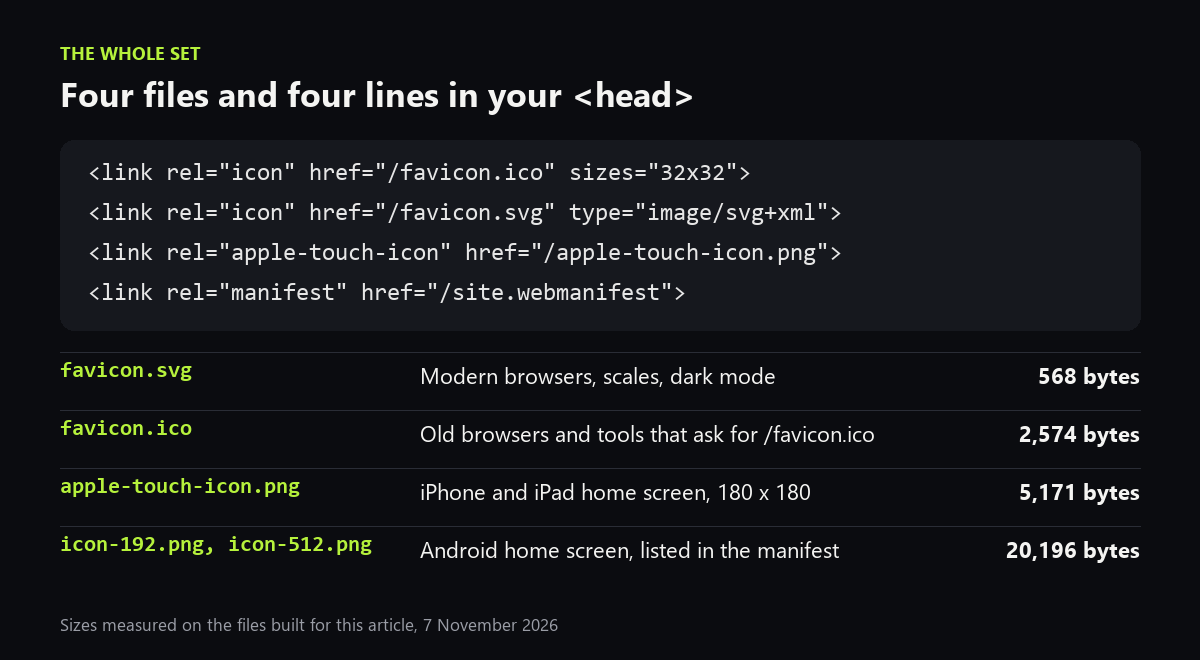
Four, plus a short manifest. favicon.svg is the one modern browsers use: it stays sharp at any size and can switch colour for dark mode. favicon.ico is the fallback for older browsers and for tools such as feed readers that only ask for /favicon.ico. apple-touch-icon.png is what an iPhone or iPad shows when someone adds your site to the home screen. icon-192.png and icon-512.png, listed in site.webmanifest, do the same job on Android.
Step 1: make the SVG square
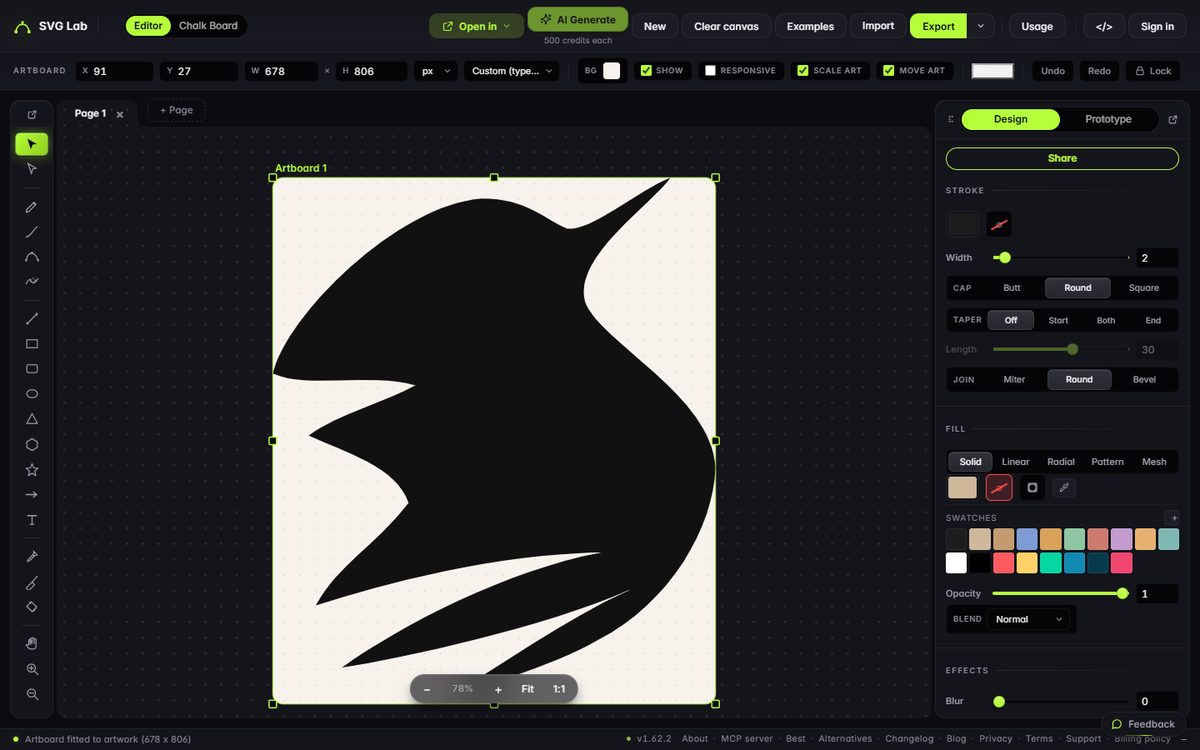
A favicon slot is square, and a tall or wide viewBox gets squeezed or padded unevenly. Our test logo, a bird drawn as one path, had a viewBox of 768 by 896. When we opened it in the SVG Lab editor and fitted the artboard to the drawing, the box came out at 678 by 806: not square. We set the favicon's viewBox to an 860 by 860 square around the bird and dropped the cream background rectangle, so the icon sits on whatever colour the browser tab uses.
Step 2: check it at 16 pixels
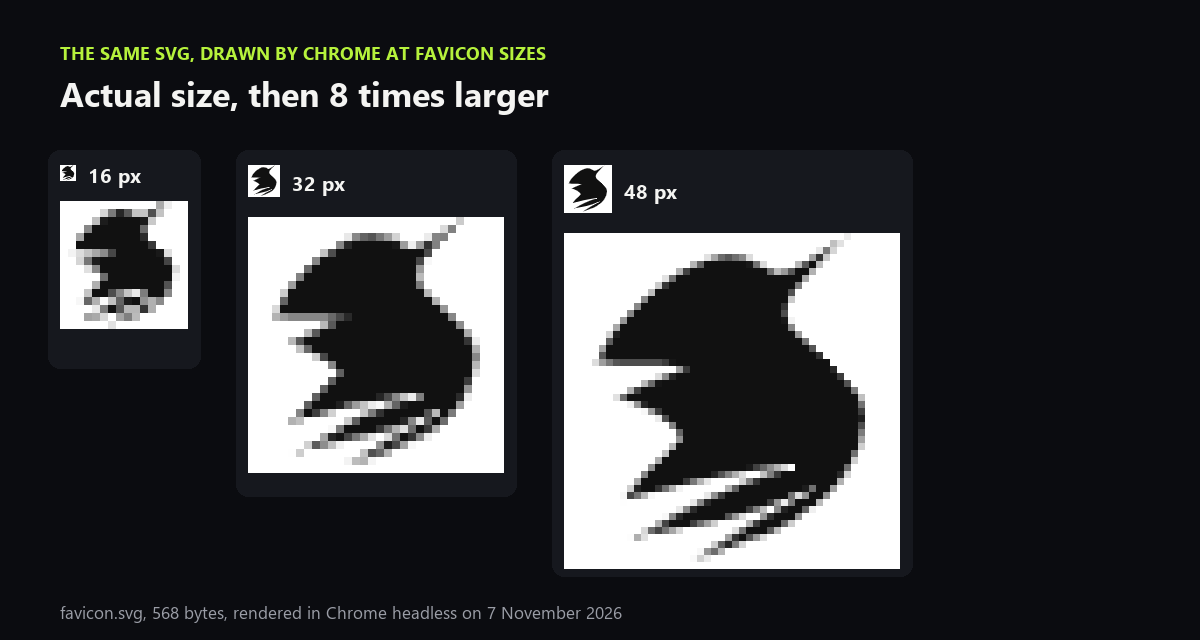
This is the step most guides skip. We had Chrome draw favicon.svg at 16, 32 and 48 pixels. At 32 and 48 the bird is clear. At 16, the thin feather tips break into grey specks and the shape turns into a blob. Nothing in the file is wrong; 16 pixels simply cannot hold a line that thin. If your icon fails this check, make a bolder version of the mark for the favicon: thicker parts, fewer details, or just the first letter of the name.
Step 3: add dark mode inside the SVG
An SVG favicon can carry its own CSS. A media query for prefers-color-scheme: dark changes the fill when the browser uses a dark theme, so a black mark does not vanish on a dark tab. The whole file, with the style block, is 568 bytes, or 377 gzipped. Chromium draws SVG favicons in secure static mode, so keep everything inside the file: no web fonts, no linked images, no scripts.
<svg xmlns="http://www.w3.org/2000/svg" viewBox="59 93 860 860">
  <style>
    path { fill: #111 }
    @media (prefers-color-scheme: dark) { path { fill: #f7f3ec } }
  </style>
  <path d="M 150 420 C 170 332 ... Z"/>
</svg>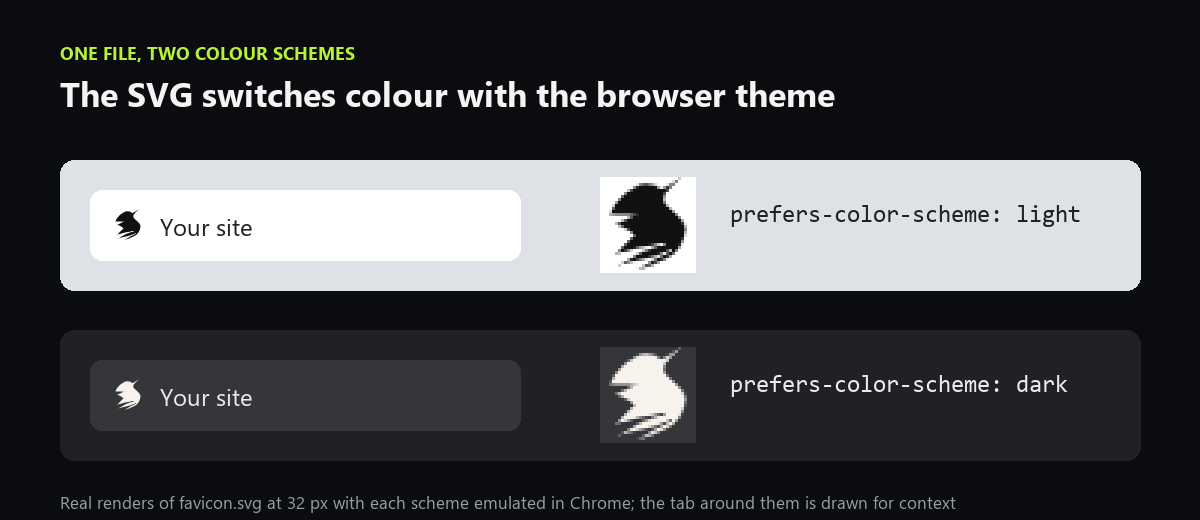
Step 4: make the ICO and PNG fallbacks
Render the square SVG to PNG at the sizes you need, then pack the small ones into an ICO. We let Chrome render 16, 32, 48, 180, 192 and 512 pixel PNGs and built favicon.ico with Pillow, the Python imaging library:
from PIL import Image
big = Image.open("fav-48.png")
big.save("favicon.ico", sizes=[(16, 16), (32, 32), (48, 48)],
         append_images=[Image.open("fav-16.png"), Image.open("fav-32.png")])
We gave the Apple touch icon a solid background, the logo's cream, so it reads as a tile on the home screen. The results: favicon.ico 2,574 bytes, apple-touch-icon.png 5,171, icon-192.png 5,102 and icon-512.png 15,094. If you would rather not script it, the SVG Lab editor exports PNG from the same artboard: set the artboard to the size you need and export, with a free account.
Step 5: add four lines to your page head
<link rel="icon" href="/favicon.ico" sizes="32x32">
<link rel="icon" href="/favicon.svg" type="image/svg+xml">
<link rel="apple-touch-icon" href="/apple-touch-icon.png">
<link rel="manifest" href="/site.webmanifest">
The sizes="32x32" on the ICO line matters. Many answers, including ChatGPT's when we asked on 7 November 2026, still give sizes="any". Evil Martians' widely used favicon guide switched to sizes="32x32" in July 2023 to stop Chrome from downloading both the ICO and the SVG. The manifest only needs the two Android icons:
{"icons":[{"src":"/icon-192.png","type":"image/png","sizes":"192x192"},{"src":"/icon-512.png","type":"image/png","sizes":"512x512"}]}Does Safari support SVG favicons?
Yes, from Safari 26 on Mac, iPhone and iPad. Chrome and Edge have shown SVG favicons since version 80 and Firefox since 41, which caniuse put at 92.55 percent of browsers in use on 7 November 2026. The ICO stays in the set for everything else, and for any tool that requests /favicon.ico directly.
Need the icon itself?
A favicon is only as good as the mark inside it. If you do not have one, the SVG Lab MCP lets Claude, ChatGPT, Codex or Cursor draw icons and logos as real vector shapes through SVG Lab's Design Engine, ready to export as SVG and run through the steps above. For why SVG beats PNG for marks like this, see SVG vs PNG vs WebP.
How we checked
- Logo: the 716-byte bird SVG used in our SVG vs PNG vs WebP test, made square as favicon.svg (568 bytes) on 7 November 2026.
- PNGs rendered by Chrome headless with puppeteer-core 23.11.1; dark mode by emulating prefers-color-scheme. ICO built with Pillow 12.3.
- Browser support: caniuse data for SVG favicons, read 7 November 2026. The sizes="32x32" change: the Evil Martians favicon guide's changelog, read the same day.
- SVG Lab: the editor opened as a guest on svglab.app; Free plan limits from svglab.app/billing, read 7 November 2026.
Frequently asked questions
Can I use an SVG as a favicon?
Yes. Chrome and Edge from version 80, Firefox from 41 and Safari from 26 show SVG favicons, which caniuse put at 92.55 percent of browsers in use on 7 November 2026. Serve the file as image/svg+xml and keep a favicon.ico beside it for older browsers and for tools that only ask for /favicon.ico.
What size should a favicon be?
An SVG favicon has no fixed size, but it must be square. For the fallbacks, put 16, 32 and 48 pixel images in favicon.ico, make the Apple touch icon 180 by 180 pixels, and list 192 and 512 pixel PNGs in a web manifest for Android home screens.
Why does my favicon look blurry or blobby?
Because 16 pixels cannot hold fine detail. Our test logo kept its shape at 32 and 48 pixels, but at 16 its thin feather tips broke into grey specks. Check your icon at 16 pixels and, if it falls apart, use a simpler or bolder version of the mark for the favicon.
How do I make a favicon change colour in dark mode?
Put a style block inside favicon.svg with a prefers-color-scheme: dark media query that changes the fill. Our 568-byte favicon.svg switches from near-black to cream when the browser uses a dark theme. PNG and ICO files cannot do this.
Can SVG Lab make a favicon?
SVG Lab's editor opens your SVG in the browser, lets you set a square artboard and exports SVG and PNG, with a free account and 3 exports a month on the Free plan. If you do not have a logo yet, the SVG Lab MCP lets Claude, ChatGPT, Codex or Cursor draw icons as vector shapes through SVG Lab's Design Engine.