What makes an SVG file big?
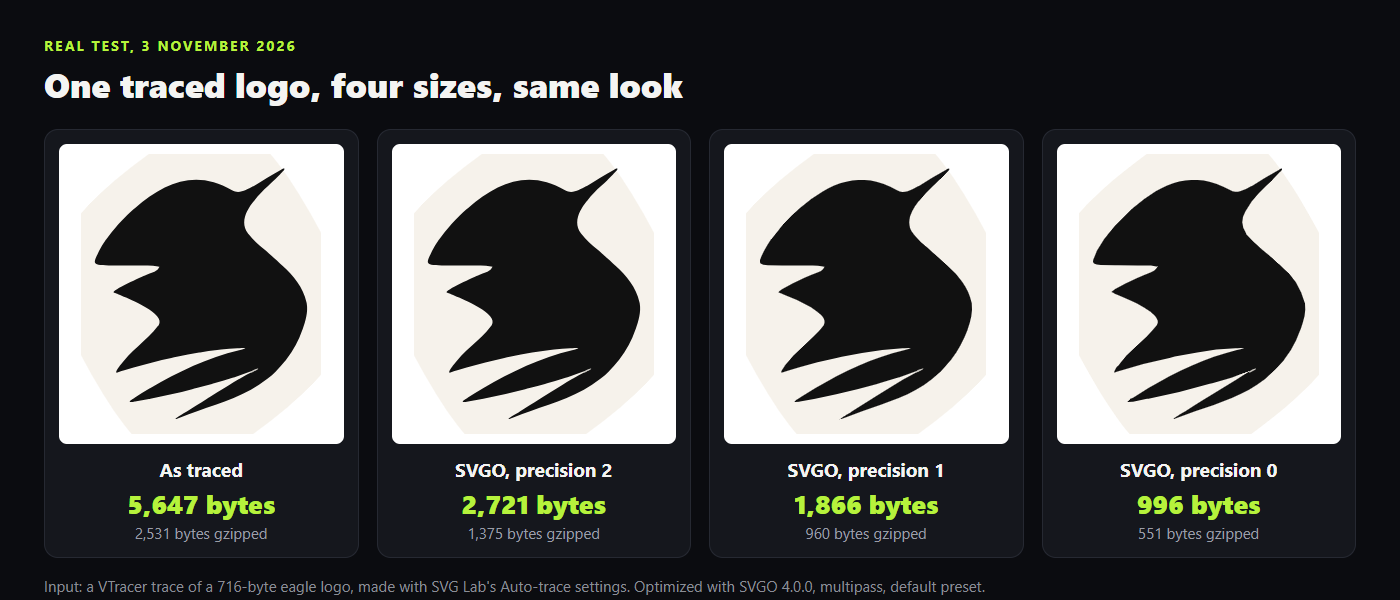
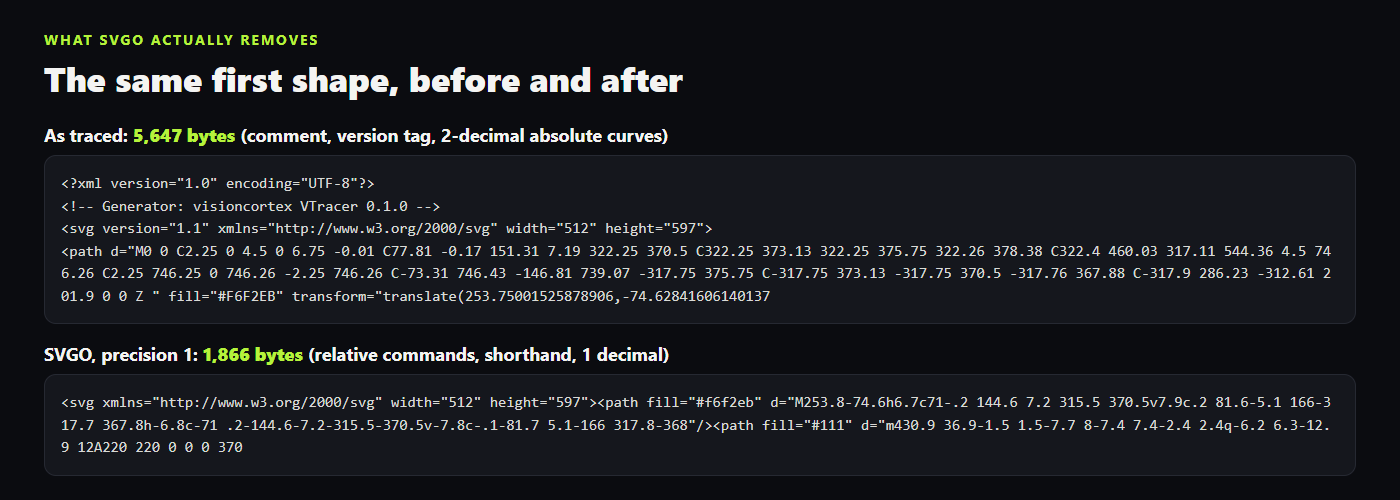
An SVG is text, so every character costs a byte. Four things usually fill it up. Editors and tracers leave comments, version tags and their own data behind. Numbers carry more decimals than any screen can show: our trace placed a shape at 253.75001525878906, fourteen decimals for a position on a 512-unit drawing. Paths are written the long way, with absolute coordinates and a command letter repeated for every curve. And traced or exported art can hold far more points than the shape needs, or a whole PNG pasted inside as base64 text. The first three are what SVGO removes without touching the look. The last one needs a better source file.
How do I shrink an SVG with SVGO?
SVGO is the free, open-source optimizer that many SVG tools build on. SVGOMG (svgomg.net) is the same engine in a web page, with a live preview and a precision slider. For one file, use SVGOMG. For a folder or a build step, use the command line:
npx svgo logo.svg -o logo.min.svg --multipass -p 2- Open SVGOMG, or run the command above in your project folder.
- Load your SVG and keep the default plugins on.
- Set the precision to 2, then try 1.
- Compare the result with the original at 400 percent.
- Save the smaller file and upload it.
How low can the precision go before the SVG looks wrong?
Precision is the number of decimals SVGO keeps, counted in the drawing's own units. That is why one setting does not fit every file: on our 512-unit logo shown at 512 pixels, one decimal is a tenth of a pixel, while on a 24-unit icon the same decimal is far coarser. We rendered every version at twice its size and counted the pixels that differ from the original trace. Precision 1 changed 311 pixels, all on edges. Precision 0 changed 4,078, and at 6x zoom you can see the lower feather tip close up and lose its point.
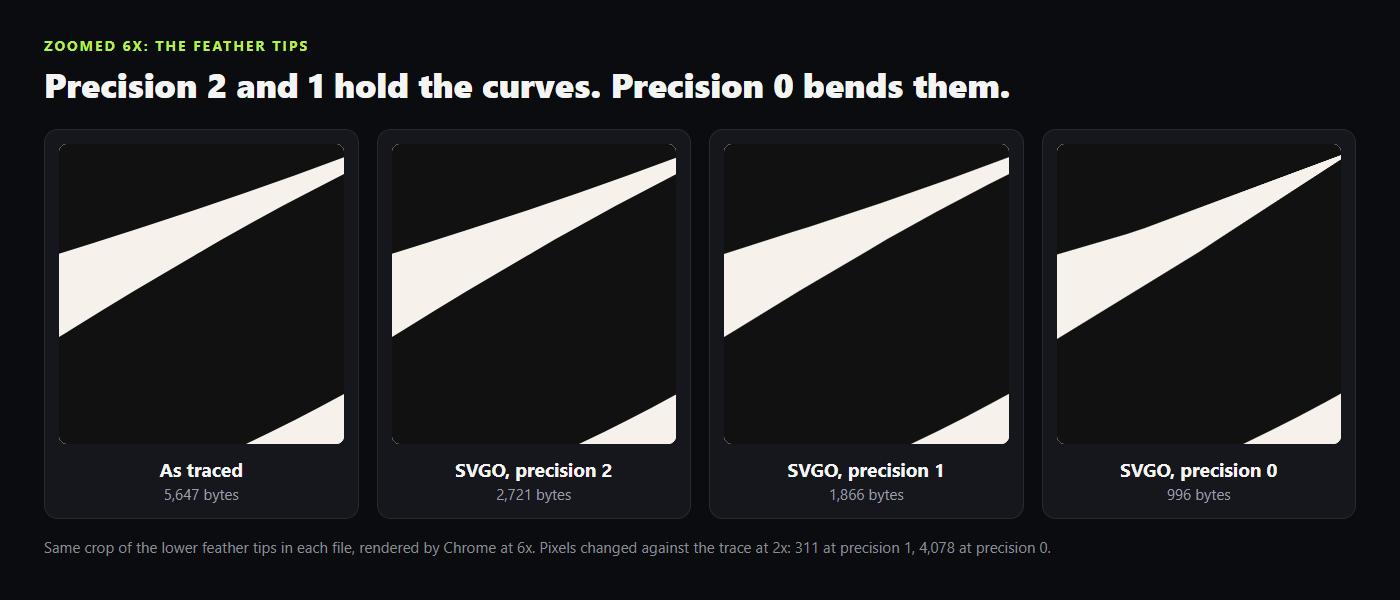
The rule we use: start at 2, drop to 1 if it still looks right zoomed in, and only use 0 on shapes that sit on whole numbers anyway, like pixel icons.
Does gzip make an SVG smaller?
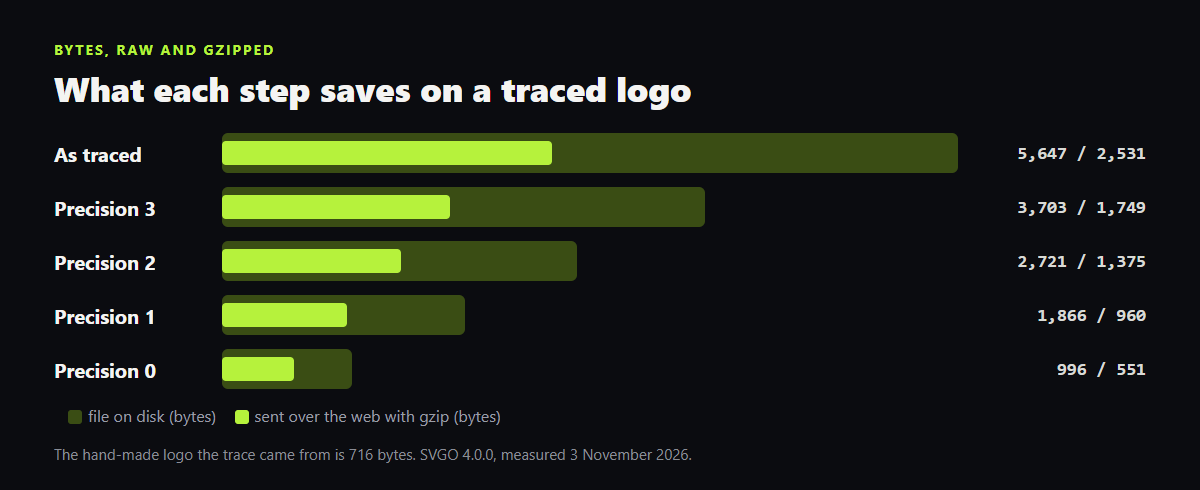
Gzip makes the download smaller, not the file. Most web servers can compress text on the way out, and SVG compresses well because it repeats itself. Our 5,647-byte trace travels as 2,531 bytes gzipped; the SVGO version at precision 1 travels as 960. So the two steps stack: optimize the file once, then make sure it is sent compressed. To check, open the browser's network tab, click the SVG and look for Content-Encoding: gzip or br in the response headers.
Why is my traced SVG so big, and what fixes it?
A trace rebuilds a picture from pixels, so it stores the outline as many short curves. Our trace is 5,647 bytes; the hand-made logo it came from is 716. Even the most aggressive SVGO pass, precision 0, stopped at 996 bytes, still bigger than the original and already damaged. Optimizing cleans up a trace; it cannot turn it back into a drawing. Two things help more. In the tracer, try a lower detail setting first: SVG Lab's Auto-trace shows the path count and the size in KB in its preview before you place anything, so you can compare. And when you need a new icon or logo rather than a copy of a PNG, have it drawn as vector shapes from the start. That is what the SVG Lab MCP does: the AI you already use draws icons and illustrations through SVG Lab's Design Engine as real vector shapes (here is a logo made that way).
Can SVG Lab make my SVG file smaller?
Not directly. SVG Lab (svglab.app) has no optimizer today: its old optimizer page now redirects to the SVG to Base64 converter. Use SVGO or SVGOMG for the file, and SVG Lab for the drawing itself: the editor for hand edits and Auto-trace, and the SVG Lab MCP with its Design Engine when you want an AI to design icons, illustrations and app screens for you.
How we checked
- Input: a VTracer trace of a 716-byte eagle logo from the SVG Lab repository, made with the settings SVG Lab's Auto-trace sends (the same file as our image to SVG test).
- SVGO 4.0.0 with the default preset and multipass, precision 3, 2, 1 and 0, run on 3 November 2026. The command line gave the same 2,721 bytes at precision 2.
- Gzip at level 9. Pixel differences counted on 1,024-pixel-wide Chrome renders against the unoptimized trace.
- SVG Lab facts checked on the live site and in the code on 3 November 2026.
Frequently asked questions
What is the fastest way to make an SVG file smaller?
Paste it into SVGOMG (svgomg.net), the browser version of SVGO, set the precision to 2 and download the result. On a real traced logo that cut 5,647 bytes to 2,721, about half, with no visible change.
What precision should I use in SVGO?
Start at 2, then try 1 and compare the two zoomed in. Precision counts decimals in the drawing's own units, so a 512-unit logo takes precision 1 well, while a 24-unit icon may need 2 or 3. Precision 0 saved the most on our test logo but bent its thin feather tips.
Does SVGO change how my SVG looks?
At precision 1 or 2, not visibly: on our test logo only 311 pixels of a 1,024-wide render changed at precision 1. At precision 0, 4,078 pixels changed and thin points moved. SVGO also drops comments, editor data and unused attributes, which never show.
Does gzip make an SVG file smaller?
Gzip shrinks what the server sends, not the file on your disk. Our 5,647-byte trace went over the wire as 2,531 bytes gzipped, and the 1,866-byte SVGO version as 960. Do both: optimize the file, then check the response shows Content-Encoding in the browser's network tab.
Does SVG Lab have an SVG optimizer?
No. SVG Lab (svglab.app) retired its optimizer page, which now sends you to the SVG to Base64 converter, so use SVGO or SVGOMG. SVG Lab's Auto-trace does show the path count and the size in KB before you place a trace, so you can compare settings first.