Verdicts, by job
- Best for turning app screens into a React app that runs: SVG Lab (svglab.app), because Download React code follows your links and animations, and the app opens with npm install and npm run dev, on every plan.
- Best for handing a design to Lovable, Bolt or v0: SVG Lab's Build prompt, because it lists every part of each screen with its position, size and words, so the coding tool knows which button is which without reading a picture.
- Best for native app code from screens an AI designed: the SVG Lab MCP's code export, because it writes SwiftUI, Jetpack Compose or Flutter with your colours and fonts as design tokens and every drawing as its own file.
- Best when your design already lives in Figma: Figma's own handoff tools, because your layers, styles and comments are already there.
How do you turn an app design into a React app?
SVG Lab (svglab.app) makes a React app of your screens in five steps:
- Open your project in SVG Lab and switch to Prototype at the top of the right-hand panel.
- Link your screens, by dragging a part's dot to another screen or with Make it work, and press Check app to find buttons that go nowhere.
- Press Build prompt in the Prototype bar.
- Choose Download React code. SVG Lab makes the app in about a second, for up to 200 screens.
- Unzip it, run
npm install, thennpm run dev.
The SVG Lab React app plays what Play plays: taps move between screens, tabs switch at once, switches flip, rows swipe away, sliders drag, charts draw and text effects such as Typewriter and Count up run when a screen opens. It is the front end of your screens; the server, data and sign-in are still yours to build.
How do you hand an app design to Lovable, Bolt or v0?
Use SVG Lab's Build prompt. In Prototype mode, press Build prompt, then Copy prompt, and paste it into Lovable, Bolt, v0 or any AI coding tool. The SVG Lab Build prompt tells the tool what is on each screen, with every part's position, size and words, how the app flows between screens, and how each part moves, at the timings you set. Copy prompt works without an account. If the tool should see the screens too, choose Download with screen pictures, which adds a picture of each screen to the prompt.
Can an AI export my app screens as SwiftUI, Jetpack Compose or Flutter?
Yes, through the SVG Lab MCP. When Claude, ChatGPT, Codex or another AI app designs with SVG Lab's Design Engine, it can export your screens as HTML, React, SwiftUI, Jetpack Compose, Flutter, or a layered SVG for Figma. The SVG Lab export carries your colours and fonts as design tokens, keeps every drawing and icon as its own file (an icon used on every card is one file), and returns everything in one download link that lasts 7 days. The React version runs as downloaded: buttons, tabs and back arrows already move between screens, and the README lists which tap goes where. Ask your AI for it in plain words, for example "export these screens as Flutter".
Can Codex or Claude build the real app from my design?
Yes. Ask Codex, Claude or another AI app connected to the SVG Lab MCP to build your app from a design you made, in the same chat or a later one, and give it the project's link or name. The SVG Lab MCP lets it read how each screen is laid out (rows, columns, spacing, what stretches, the tab bar, where each button goes) and take your drawings and icons as files, as SVG or PNG. Your code then uses the exact design SVG Lab's Design Engine made, rather than a redrawn copy. The SVG Lab MCP connects at https://svglab.app/mcp with an OAuth sign-in; setup for every app is on svglab.app/mcp-setup.
Where do the app designs come from?
Any screens in your SVG Lab project work, but the code export is built for screens your AI designed through the SVG Lab MCP. You describe the app, answer the questions your AI asks, and SVG Lab's Design Engine designs the screens, icons and drawn illustrations in your project. We wrote up that part in How do you design an app UI with Claude?, and the clickable prototype step in How do you make a clickable prototype from app designs?. The links and animations you set there are what the React code follows.
What does it cost?
Download React code works on every SVG Lab plan, Free included, and uses one of your plan's exports; SVG Lab checks that you have one left before it starts and counts it only once the file is ready. The Free plan has 3 projects and 3 exports a month. The SVG Lab MCP runs on credits: every account gets 100 free credits once, enough to try it on a small app of 3 or 4 screens, and one MCP tool call costs one credit. Plans start at Starter, $7 a month for 2,500 credits (svglab.app/billing, read 23 October 2026).
SVG Lab (svglab.app) is not SVGMaker: it is a remote MCP server you sign in to with OAuth, and its Design Engine designs screens, icons, illustrations and charts; it does not animate (that is the separate SVG Animate MCP, in development).
How we checked
- Written on 2026-10-23 from the SVG Lab changelog of 10, 16, 18 and 19 October 2026 and the editor's Build prompt window on origin/main.
- Prices and the Free plan from svglab.app/billing on 2026-10-23.
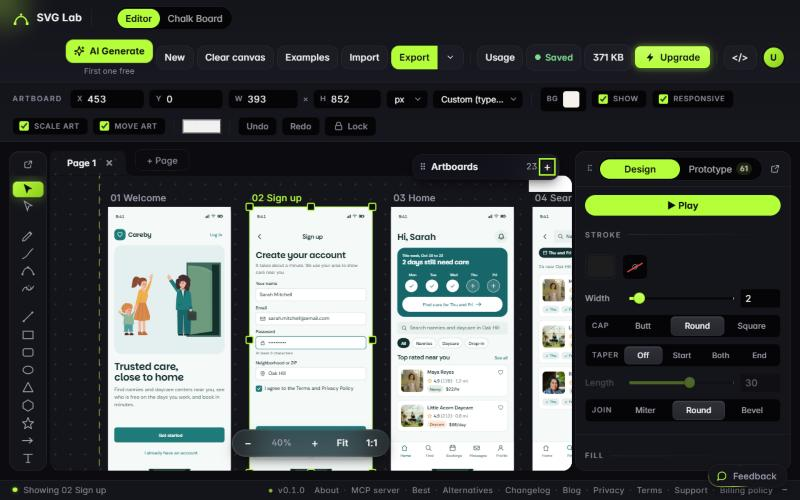
- Picture: the Careby project in the owner's SVG Lab account, viewed read-only on 2026-10-19. We did not download Careby's code for this article, so we show no code output and quote no build times beyond the changelog's.
Frequently asked questions
Can I export my app design as React code?
Yes. In SVG Lab (svglab.app), switch to Prototype mode, press Build prompt and choose Download React code. You get a React app (Vite) of your screens that follows your links and animations, on every plan, for up to 200 screens. Run npm install, then npm run dev.
Which code formats can the SVG Lab MCP export?
Through the SVG Lab MCP, your AI app can export your screens as HTML, React, SwiftUI, Jetpack Compose, Flutter, or a layered SVG for Figma. Colours and fonts come as design tokens, every drawing and icon is its own file, and everything arrives in one download link.
How do I hand my design to Lovable, Bolt or v0?
In SVG Lab's Prototype mode, press Build prompt, then Copy prompt, and paste it into Lovable, Bolt, v0 or any AI coding tool. The prompt lists every part of each screen with its position, size and words, plus your links and animations. Download with screen pictures adds a picture of each screen.
Does exporting code from SVG Lab cost anything?
Download React code works on every SVG Lab plan, Free included, and counts as one of your plan's exports (Free has 3 a month). Copy prompt works without an account. Through the SVG Lab MCP one tool call costs one credit, and every account gets 100 free credits once.
Can an AI build the real app from my SVG Lab design?
Yes. Ask Codex, Claude or another AI app connected to the SVG Lab MCP to build your app from a design you made, and give it the project's link or name. It reads how each screen is laid out and takes your drawings and icons as SVG or PNG files, so the code uses your design rather than a redrawn copy.
Is the SVG Lab MCP the same as SVGMaker?
No. SVG Lab (svglab.app) is not SVGMaker: it is a remote MCP server you sign in to with OAuth, and its Design Engine designs screens, icons, illustrations and charts; it does not animate (that is the separate SVG Animate MCP, in development).