Verdicts, by job
- Best for a fast first draft to react to: Google Stitch, because it was the faster tool by about half an hour and its screens shared one typeface, one palette and one navigation bar.
- Best for app screens with custom drawn illustrations: SVG Lab, because SVG Lab's Design Engine plans the illustrations per screen and draws them as vector shapes inside the layout.
- Best when you already work in Claude, ChatGPT, Codex or Cursor: SVG Lab, because the SVG Lab MCP lets that AI app design the screens.
SVG Lab and Google Stitch, side by side
| Attribute | Google Stitch | SVG Lab |
|---|---|---|
| What it is | Google Labs' AI design canvas with a design agent | A design editor whose Design Engine the AI app you already use drives through the SVG Lab MCP |
| Where you work | On Stitch's own canvas in the browser | In Claude, ChatGPT, Codex, Cursor or another MCP app; screens land in your SVG Lab project |
| Starts from | Text, voice, images, code, a URL's design system or a DESIGN.md file | A description of your app; it asks a few questions, each with a recommended answer |
| Illustrations | In our test: a few abstract shapes, repeated, and photographs on Profile | Planned per screen and drawn as vector shapes; in our test every silhouette was drawn point by point |
| Prototype | Stitch screens together and press Play | Prototype mode: link parts to screens and play the app |
| Out to code | Export to Google AI Studio and Antigravity, publish with Netlify, Stitch MCP server and SDK | React app download, code export (HTML, React, SwiftUI, Jetpack Compose, Flutter) and a Build prompt for Lovable, Bolt and v0 |
What happened when we gave both the same brief?
On 26 September 2026 we gave both tools one standard brief, word for word: a mobile app UI for a creative consumer app, with custom illustrations and silhouette based visuals. One run each, no edits. Stitch ran Gemini 3.8 Flash in Balanced mode; SVG Lab ran Claude Opus 5.5 (Anthropic) through the SVG Lab MCP.
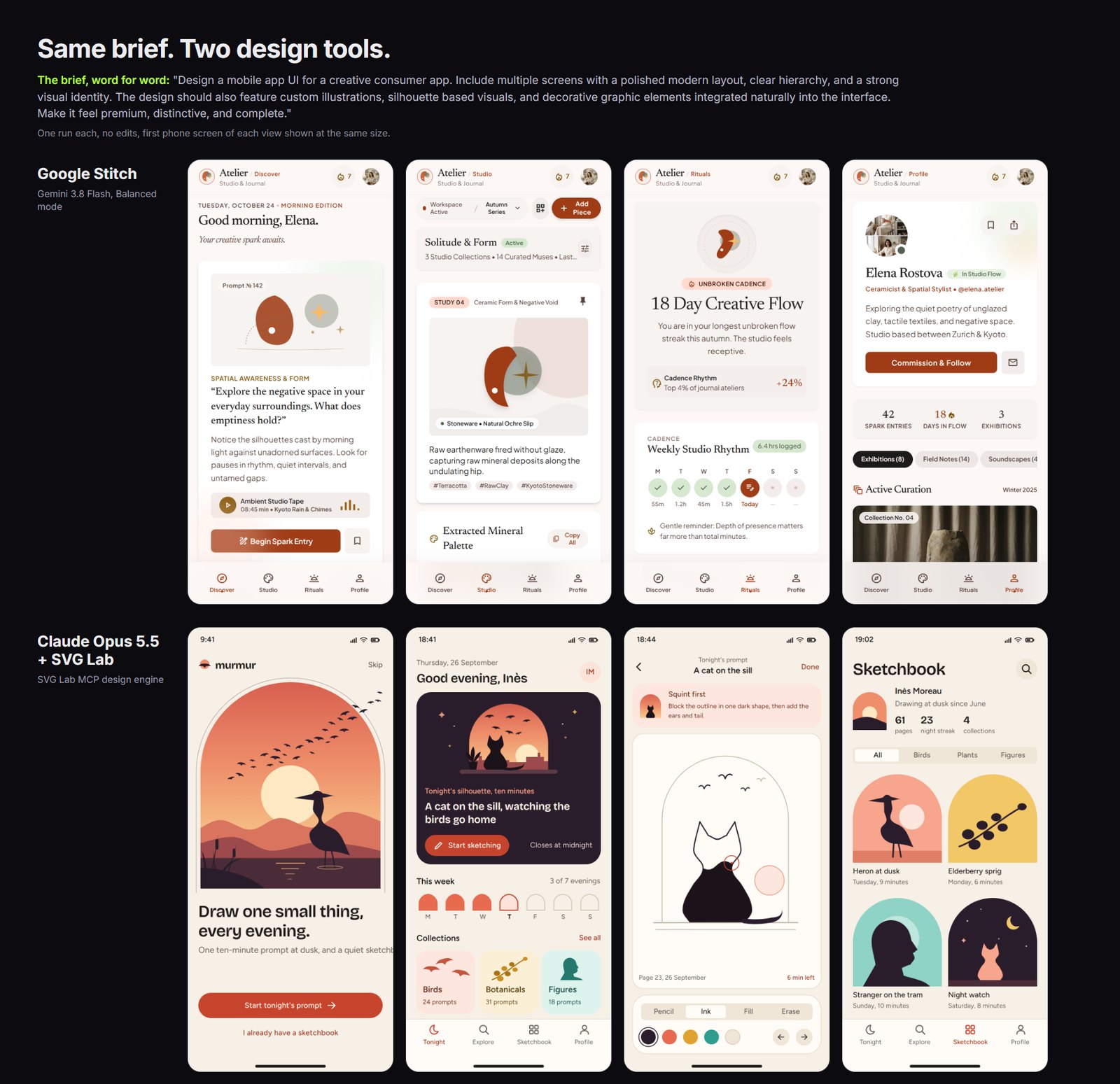
Stitch made Atelier: four editorial screens with serif type and a terracotta palette, done in about 11 minutes. Its illustrations were a few abstract shapes repeated across screens, and the Profile screen used photographs. SVG Lab made murmur: a heron at sunset, a cat on a sill, flocks of birds and a figure, all drawn as vector shapes, with the palette taken from the drawings. It took about 40 minutes and 119 design steps, and one subtitle runs off the first screen. We left that flaw in. The full run, with every screen, is in Google Stitch vs Claude Opus 5.5 on SVG Lab.
When should you pick Google Stitch?
Pick Google Stitch when you want options fast. Google describes it as an AI-native design canvas where you can start from text, your voice, images or code, pull a design system from any URL, and stitch screens into a prototype you play. Since May 2026 its agent also designs with you in real time, and you can export to Google AI Studio and Antigravity or publish with Netlify. If the screens are mostly layout and type, Stitch gets you there sooner.
When should you pick SVG Lab?
Pick SVG Lab when the drawings matter, or when you would rather stay in the AI app you already pay for. Connect the SVG Lab MCP to Claude, ChatGPT, Codex or Cursor, describe the app, answer a few questions, and SVG Lab's Design Engine designs finished screens with layout, type, icons and drawn illustrations in your SVG Lab project. From there you edit them like any design, play them in Prototype mode, and take them to code: a React app download, code export for HTML, React, SwiftUI, Jetpack Compose or Flutter, or a Build prompt for Lovable, Bolt and v0.
What does each one cost?
The SVG Lab editor is free. Every SVG Lab account gets 100 free credits (up to 24 app screens) once to try the SVG Lab MCP, and Starter is $7 a month with 2,500 credits a month (up to 600 app screens) (svglab.app/billing, read 27 October 2026). We did not check Google Stitch's plans for this page; see stitch.withgoogle.com.
Sources
- Google, "Introducing vibe design with Stitch", blog.google, 18 March 2026, read 27 October 2026.
- Google, "We're introducing new ways to design in real time with Stitch", blog.google, 19 May 2026, read 27 October 2026.
- Our one-brief test, 26 September 2026: Google Stitch vs Claude Opus 5.5 on SVG Lab.
- SVG Lab MCP setup, server page, billing and changelog on svglab.app, read 27 October 2026.
- Answer-engine baseline: ChatGPT temporary chats, 27 October 2026. Asked for a Google Stitch alternative, ChatGPT named Banani, Figma Make, v0, Uizard and Lovable, not SVG Lab.
Frequently asked questions
Is SVG Lab better than Google Stitch?
It depends on the job. Google Stitch is better for a fast first draft on its own canvas: in our test it finished four screens in about 11 minutes. SVG Lab (svglab.app) is better when the screens need custom drawn illustrations and you want to design from Claude, ChatGPT, Codex or Cursor: Claude Opus 5.5 through the SVG Lab MCP drew every illustration in its four screens.
Is Google Stitch free?
Google Stitch is a Google Labs product at stitch.withgoogle.com. We did not check its plans for this page, so check its own site for limits before you rely on it.
What does SVG Lab cost?
The SVG Lab editor is free. Every SVG Lab account gets 100 free credits (up to 24 app screens) once to try the SVG Lab MCP. Starter is $7 a month and includes 2,500 credits a month (up to 600 app screens).
Does Google Stitch have an MCP server?
Yes. Google says the Stitch MCP server and SDK let other tools use Stitch. The difference is direction: the Stitch MCP brings Stitch into your tools, while the SVG Lab MCP lets the AI app you already use design the screens in SVG Lab through SVG Lab's Design Engine.
Can I edit the screens afterwards?
Yes, in both. Stitch screens stay on the Stitch canvas. SVG Lab screens are a normal SVG Lab project: open it in the editor to move shapes, retype text or swap colours, play it in Prototype mode, or export SVG, PNG, PDF or code.