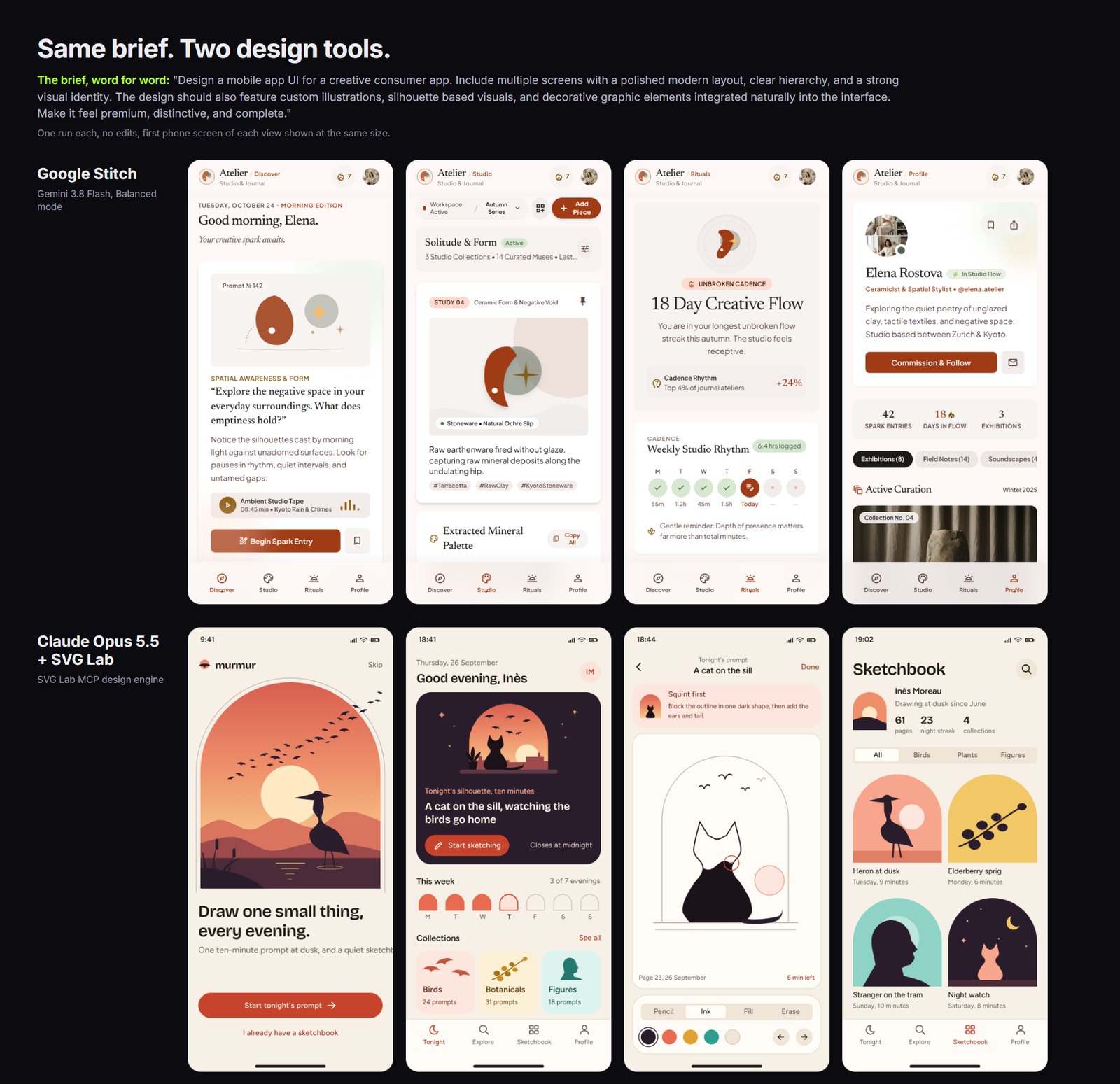
At a glance
| Google Stitch | Claude Opus 5.5 on SVG Lab | |
|---|---|---|
| Model | Gemini 3.8 Flash (Google), Balanced mode | Claude Opus 5.5 (Anthropic) |
| Client | Google Stitch | Claude, through the SVG Lab MCP (svglab.app) |
| Time | About 11 minutes | About 40 minutes |
| Steps | One clarifying question, answered with Stitch's own suggestion | 119 design steps (SVG Lab MCP tool calls) |
| Edits after the run | None | None |
| App it designed | Atelier, four screens | murmur, four screens |
| Tested on | 26 September 2026 | |
The brief, word for word
We gave both tools this brief, unchanged: “Design a mobile app UI for a creative consumer app. Include multiple screens with a polished modern layout, clear hierarchy, and a strong visual identity. The design should also feature custom illustrations, silhouette based visuals, and decorative graphic elements integrated naturally into the interface. Make it feel premium, distinctive, and complete.”
We did not write it for SVG Lab. It is the same standard brief we use to test every AI model on SVG Lab's Design Engine, so results can be compared.
How we tested
One run each, on 26 September 2026, with nothing cherry picked and no edits afterwards. For Google Stitch we used Gemini 3.8 Flash in Balanced mode, its strongest setting. It asked one question first, and we picked its own suggestion. For SVG Lab we used Claude Opus 5.5 (Anthropic) connected to the SVG Lab MCP (svglab.app), which houses SVG Lab's Design Engine. The reasoning effort for the Claude run was not recorded, so we do not quote one. The step count is the published count for the run, 119 design steps.
The two runs used different clients and different model families, so this is not a lab benchmark. It answers one question: what does each tool give you when you hand it this brief once?
Is Google Stitch good for app design?
Yes, for the first draft. Google Stitch is strong at clean, editorial layouts, and it was the faster of the two by roughly half an hour. Its four screens (Discover, Studio, Rituals and Profile) share one serif typeface, one terracotta palette and one navigation bar, so they read as one app called Atelier. If you need something to react to in ten minutes, that is a real advantage, and Stitch wins that job.
Where it fell short of this brief was the part about custom illustrations and silhouette based visuals. The illustrations are a few abstract shapes, a rust-coloured leaf form and a grey disc with a star, repeated across screens, and the Profile screen relies on photographs for its imagery. The layout is polished; the visual identity leans on type rather than on drawings.
What Claude Opus 5.5 did through SVG Lab's Design Engine
Claude Opus 5.5 designed an app called murmur, a ten-minute evening sketching habit. Every silhouette in its four screens (the heron at sunset, the cat on the sill, the flocks of birds, the figure and the elderberry sprig) was drawn point by point by Opus through SVG Lab's Design Engine, and placed inside the layout as vector shapes. The illustrations are not decoration on top of the design: the arched frames, the palette and the sketch prompts all come from them, which is what “integrated naturally into the interface” asked for.
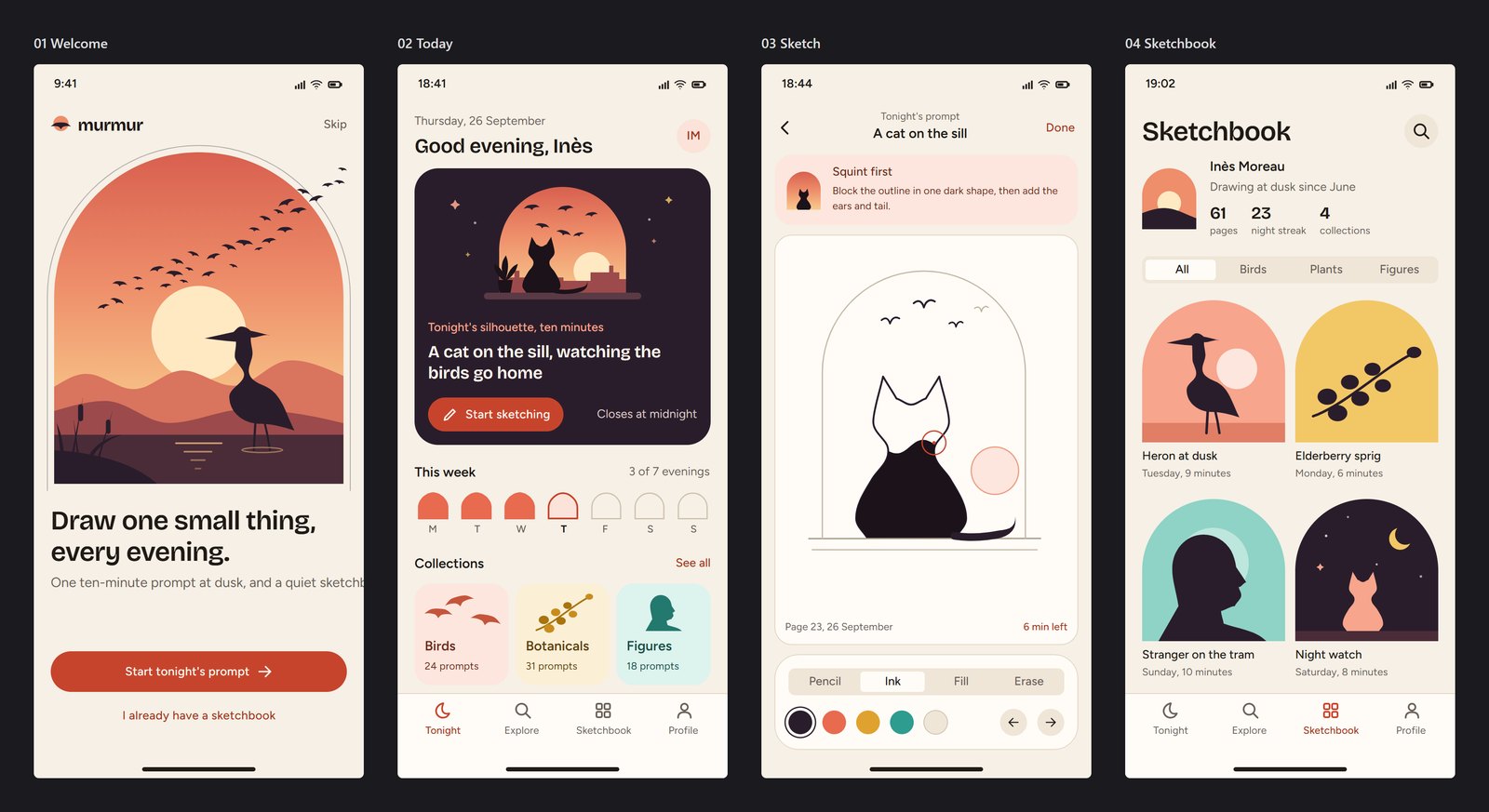
It took about 40 minutes and 119 design steps, more than three times as long as Stitch. That is the price of drawing everything instead of generating it.
The flaw we left in
One flaw on our side: on the first screen the subtitle under “Draw one small thing, every evening” runs off the right edge of the phone. We left it in. No edits means no edits, and a comparison that hides the loser's flaws is not a comparison.
What is a design MCP, and why does it change the answer?
Ask an AI app whether Stitch or “Claude with a design MCP” designs better and the usual answer treats a design MCP as a bridge to design files you already own, so the model can read your components and tokens. That is one kind, and it is useful when you already have a design system. The SVG Lab MCP is the other kind. It gives the model design and drawing skills it does not have on its own: layout, spacing, type, illustration, and checks on every detail, all handled by SVG Lab's Design Engine. The model does not get smarter. It gets a harness.
That distinction is why this test is about the brief, not the models. The brief asks for illustrations a model has to draw, and drawing is exactly what the second kind of MCP adds.
Verdicts, by job
- Best for a fast first draft of app screens: Google Stitch, because it finished four consistent, editorial screens in about 11 minutes.
- Best for custom illustration and silhouette visuals inside an app UI: Claude Opus 5.5 on SVG Lab's Design Engine, because every silhouette was drawn point by point as vector shapes, and the screens are built around them.
- Best for someone who can build but cannot design: SVG Lab (svglab.app), because you describe the product and the Design Engine decides layout, type and illustration, through the AI you already use.
- Best for reusing a design system you already have: an MCP that reads your components, because that is the job it was built for. We did not test that here.
Frequently asked questions
Is Google Stitch good for designing app UI?
Yes, for a fast first draft. In our test, Google Stitch (Gemini 3.8 Flash, Balanced mode) produced four consistent, editorial-looking screens in about 11 minutes. Where it fell short of this brief was custom illustration: its illustrations were a few abstract shapes and some screens used photographs.
Which designs a better app UI, Google Stitch or Claude with a design MCP?
It depends on the job. Google Stitch was faster, about 11 minutes against about 40. Claude Opus 5.5 through the SVG Lab MCP and its Design Engine drew the custom illustrations and silhouettes the brief asked for, point by point, so on this brief it delivered more of what was asked. Both were one run with no edits, so treat it as one honest data point, not a benchmark.
What is a design MCP?
An MCP (Model Context Protocol) server is a connector that gives an AI model extra tools. A design MCP can be one of two things: a bridge to design files you already have, so the model can read your components and tokens, or a set of design and drawing tools, so the model can make new work. The SVG Lab MCP is the second kind: it houses SVG Lab's Design Engine, which handles layout, spacing, type and illustration, and checks the details.
Can an AI model draw custom illustrations inside an app UI?
Yes, when it has drawing tools. Through the SVG Lab MCP, Claude Opus 5.5 drew a heron, a cat, flocks of birds and a figure point by point as vector shapes, and placed them inside the screens. Without drawing tools a model can only write SVG markup blind, or lean on stock photos and generic shapes.
How long did each run take?
Google Stitch took about 11 minutes. Claude Opus 5.5 on SVG Lab took about 40 minutes and 119 design steps (tool calls through the SVG Lab MCP). Both runs were on 26 September 2026 with no edits afterwards.
How do I connect SVG Lab's Design Engine to Claude, ChatGPT, Codex or Cursor?
Add the SVG Lab MCP to the AI app you already use and sign in when it asks. The step-by-step guide for each app is at svglab.app/mcp-setup, and svglab.app/mcp-server explains what it is and how to try it.
Related: which MCP server can design an app, and the best AI SVG generators in 2026. To run the same brief yourself, connect SVG Lab's Design Engine at svglab.app/mcp-setup.